Invoice numbers, totals, dates and line items, out of emails, PDFs, Office files and scans and into a spreadsheet or database, without writing rules. Highlight a value in a sample, or describe it in plain words and let AI find it. Doubtful reads wait for your approval instead of landing in your data wrong. And save many emails into many folders, named from what is inside them.
PRO Parser from $99.99 a year. Includes PRO Backup.30-day money-back guarantee.
Or click any step to see how it works
Each edition includes the one below it. With PRO Parser you get the full backup features below, plus the Parser on this page.
Search, or click a card to see how it works on the features page, already filtered to PRO Parser. PRO Parser also includes every PRO Backup feature.
Build the folder and file name from any email field or value the Parser reads, such as the supplier or an invoice number. Choose to save attachments, the email as .eml, or both. Missing folders are created.
See details →The Parser tab reads fields out of emails and their files. Highlight a value in a sample email, or just describe it in words and let AI find it, and the parser finds it in the next ones.
See details →Build a parser from the real thing. Pick samples from your mailbox (similar emails are grouped together), from the emails History has already kept (no sign-in, nothing is fetched again), or from files: .eml, .msg, PDF, Word, Excel, pictures and scans, which…
See details →Select the invoice number, a date or a total in a sample and the Parser works out how to find it again. It checks the pattern against every sample, and a hit rate under each field shows how many it reads. When one misses, a drawer says why and what to try.…
See details →Don't want to mark each value? Describe the field in plain words, such as "the invoice number" or "the payment due date", and the AI finds it and highlights where it read it in the document, with a confidence percentage and the quote it came from. A value the…
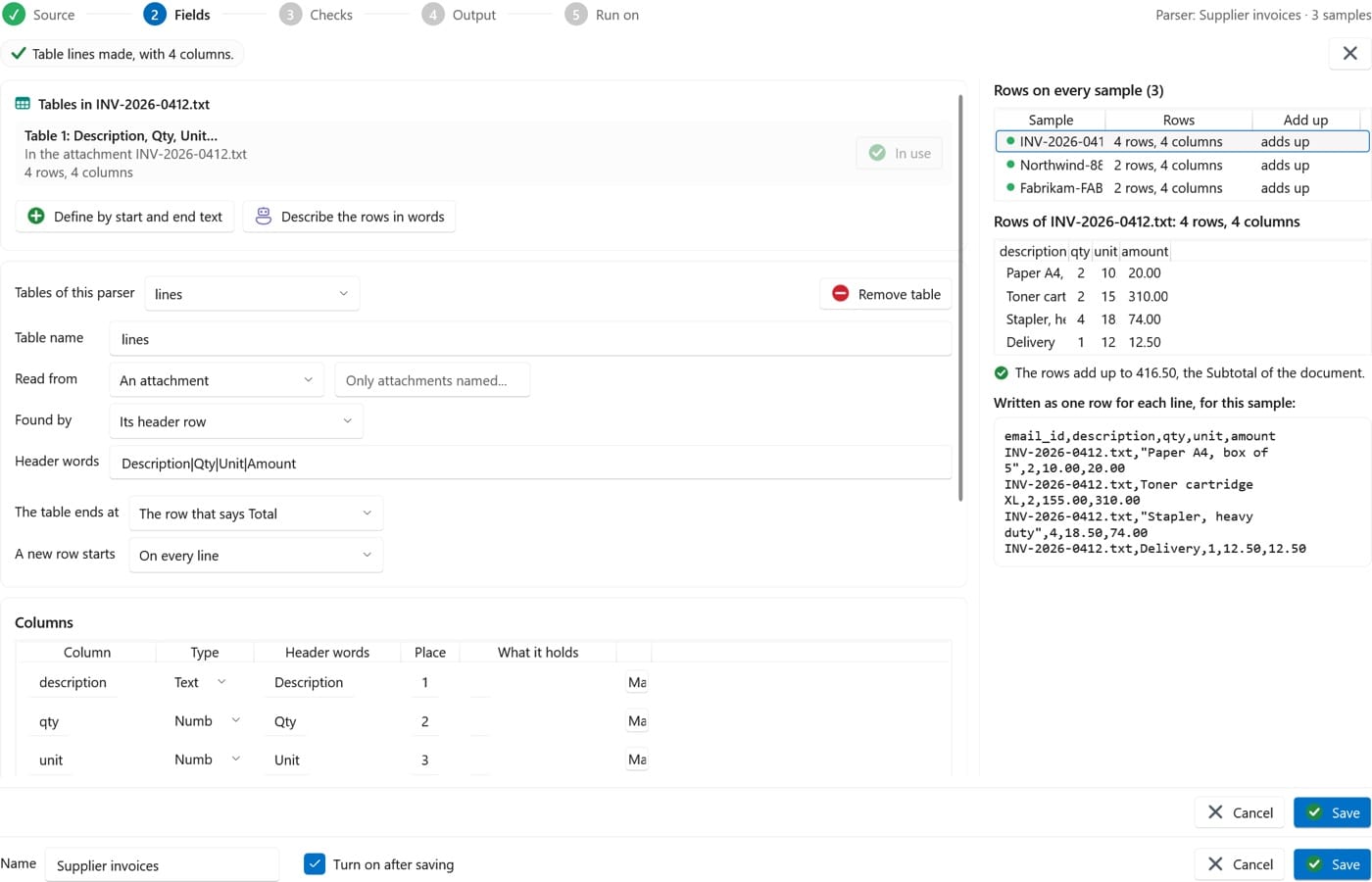
See details →Invoices and orders are mostly tables, and the Parser reads them as rows and columns. It finds tables in PDFs, HTML emails, spreadsheets and CSV files. It joins a table that runs over several pages, keeps a wrapped description with its row, and stops at the…
See details →Many invoices carry a structured copy of themselves. The Parser reads it exactly, with no pattern and no AI: invoice number, dates, seller and buyer, VAT ids, IBAN, totals and every line item. It reads Factur-X and ZUGFeRD 2, XRechnung, Peppol BIS Billing and…
See details →Give a field a pattern and an AI backup. The pattern reads what it can; the AI is asked only when the pattern finds nothing. Add a second AI model as well: the first model reads everything, and the second is asked only for the fields the first left empty or…
See details →Decide what a good read looks like, and let the Parser hold back everything else. Mark fields required, add checks (not blank, between two values, in a list, not before a date), check that subtotal plus tax equals the total, and review when the AI is less…
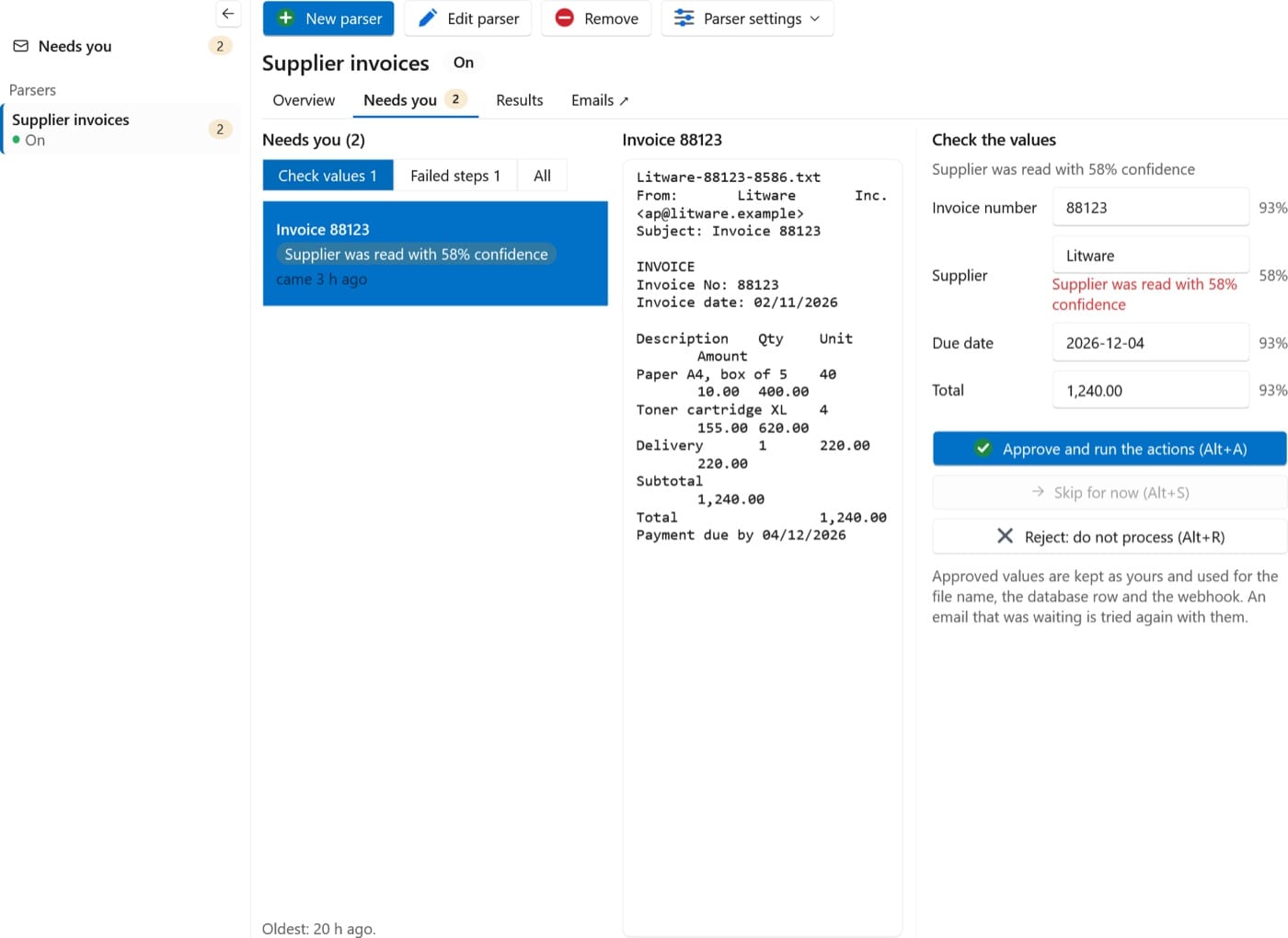
See details →Emails that failed a check wait in Needs you instead of landing in your data wrong. Open one and you see the kept copy of the email beside its values, each with the AI's confidence. Fix a value and Approve (your values are kept as yours and the email carries…
See details →Not sure which AI to use? Compare models runs each one on your samples and marks it against the answers you confirmed: how many fields it got right, how long an email takes, the estimated cost of 1,000 emails (using the prices you type in), and where your…
See details →See everything a parser has read, newest first: filter by time, by state (done, waiting, corrected or approved) or by text, export to CSV or JSON, jump to the emails in Activity, or Process again from the kept copies, which never fetches anything from your…
See details →Parsers go quiet when a sender changes their invoice. Health shows emails read, the share of fields found, how many are waiting, and an 8-week trend for each field. When a field's hit rate drops well below its recent average you get a drift alert, with Open…
See details →Send what a parser reads to CSV (values with commas are quoted properly), Excel or Google Sheets, using a Columns list of the fields you choose. Processing an email again replaces its row instead of adding a second. The lines of a table can go to their own…
See details →Before you switch a parser on, see which emails from the last 30 days its conditions would pick. Turn it on and, if you like, process those kept emails straight away, from the stored copies, so nothing is downloaded again. It is saved as a PRO rule, and the…
See details →Describe a field in plain words and the AI finds it and highlights where it read it in the document, with a confidence percentage. A pattern handles what it can and the AI is the backup.
See details →The best way to get values out of emails and files: highlight a value or describe it in plain words, read tables and e-invoices, fall back to AI, and send doubtful emails to review.
See details →No feature matches that yet. Browse all features.
Every email and file the Parser reads can be saved exactly where you want it. Build the folder and the file name from anything the email carries or the Parser reads: the sender, the date, the subject, the account, a supplier name, an invoice number, a total. Missing folders are created for you.
One format per account. Every email in an account is saved the same way, in a fixed file format and one folder pattern, whatever it contains.
D:\Mail\Attachments\ Invoice.pdf Statement.pdf Order.pdf Receipt.pdf Remittance.pdf Credit note.pdf ...Example: one folder, the same pattern for everything in the account.
Many folders, named from the contents. A different folder and file name for each kind of email, built from the sender, the date or a value inside it, and the values also go to CSV, Excel or Google Sheets.
D:\Finance\
Acme Office Supplies\
2026-10\
2026-10-19_INV-2026-0412.pdf
2026-10-21_INV-2026-0413.pdf
Northwind Traders\
2026-10\
2026-10-18_PO-55302.pdf
Fabrikam\
2026-11\
2026-11-03_INV-88123.pdfExample: {SUPPLIER}\{MONTH}\{INVOICE_DATE}_{INVOICE_NUMBER}.pdf, built from the invoice itself.A hundred invoices from twenty suppliers land in a folder per supplier, per month or per account, without you moving a file.
D:\Finance\{SUPPLIER}\{INVOICE_NUMBER}_{FILENAME}{EXT}Alongside the saved files, the values the Parser reads go to CSV, Excel or Google Sheets, so the same email feeds a folder and a spreadsheet.
Name files from what is inside them, such as the invoice date and number, even if you never send a value to a spreadsheet. Predictable names also keep the same email from being saved twice.
Details on the features page → · Need conversion to PDF or other formats? See PRO Rules.
For accounts payable, finance and operations teams who get invoices, orders and reports by email, and for anyone who wants files named and filed by what is inside them. You teach the Parser from real examples; it reads the next ones.
Pick a few sample emails or files. Highlight the invoice number, or say “the invoice number”.
See the hit rate on every sample, test the output, and see which of your last emails it would pick before it runs.
Values go to CSV, Excel or Google Sheets. Anything doubtful waits in Needs you for a quick review.
Build a parser from the real thing. Pick sample emails from your mailbox (similar emails are grouped, so the invoices from one supplier sit together), from emails the backup has already kept (nothing is fetched again), or from files: .eml, .msg, PDF, Word, Excel, pictures and scans.
Drop files straight onto the sample list, or start from a ready-made set. A saved parser remembers its samples, so you can open it later and keep teaching it.
Select the invoice number, a date or a total in a sample and the Parser works out how to find it in the next one. It checks the pattern against every sample, and a hit rate under each field (3 / 3 in the picture) shows how many samples it reads. When one misses, a drawer says why and what to try.
Pattern fields are fast and free, and nothing is sent anywhere.
Don't want to mark each value? Describe the field in plain words, such as “the invoice number” or “the date payment is due”. The AI finds the value and highlights where it read it, with a confidence percentage and the quote it came from. A value the AI invents that is not in the text is flagged. Suggest fields and tables proposes the ones a sample offers, so you tick what you want.
You choose the AI. The built-in AI runs on your own system (nothing leaves it). Or use your own AI server, OpenAI, Claude, Gemini or Azure OpenAI. A cloud AI asks first and names exactly what would leave your computer.
AI has so far been tried against test services and fake models only.
Invoices and orders are mostly tables, and the Parser reads them as rows and columns. It finds tables in PDFs, HTML emails, spreadsheets and CSV files, joins a table that runs over several pages, keeps a wrapped description with its row and stops at the Total row.
Then it checks that the lines add up to the document's subtotal or total, so a misread amount does not slip through. Learn a table from several samples, select the lines you want, or describe the rows in words. Mark a table as optional if some documents do not have one.
The lines can go to Excel, Google Sheets or a database, one row per line, linked to the email's row.

Many invoices carry a structured copy of themselves. The Parser reads it exactly, with no pattern and no AI: invoice number, dates, seller and buyer, VAT ids, IBAN, totals and every line item.
It reads Factur-X and ZUGFeRD 2, XRechnung, Peppol BIS Billing and EN 16931 (UBL and CII), as a separate XML file or as the XML embedded in a PDF, and credit notes too. Nothing leaves your computer, and each value is highlighted where it sits in the invoice data.
Give a field a pattern and an AI backup. The pattern reads what it can; the AI is asked only when the pattern finds nothing, so most reads cost nothing.
Add a second AI model as well: the first model reads everything, and the second is asked only for the fields the first left empty or was not sure of. Run the first locally and the second in the cloud, and the cloud only sees the gaps. Answers are remembered while the program runs so the same question is not paid for twice, and your emails' text is never kept.
Not sure which AI to use? Compare models runs each one on your samples and marks it against the answers you confirmed: how many fields it got right, how long an email takes, the estimated cost of 1,000 emails (from the prices you type in) and where your data goes.
It can also propose a setup: the built-in model first, and a cloud model only for the emails where a field is empty or under 80 percent sure. Save it as the second model with one click.
The picture uses made-up models and times, not measured results.
Decide what a good read looks like. Mark fields required, add checks (not blank, between two values, in a list, not before a date), check that subtotal plus tax equals the total, and send an email to review when the AI is less sure than a percentage you set. A table that is missing or does not add up is held too, and the same invoice arriving twice can be skipped or reviewed.
A held email stops the steps after it: nothing is written to your CSV, database or sheet, sent or moved until someone approves it.
Emails that failed a check wait in Needs you instead of landing in your data wrong. Open one and you see the kept copy of the email beside its values, each with the AI's confidence. Fix a value and Approve (your values are kept as yours and the email carries on), Skip it, or Reject it with a reason.
Waiting emails survive a restart, and a badge shows how many are waiting.

Results lists everything a parser has read, newest first. Filter by time, state or text, export to CSV or JSON, jump to the emails, or Process again from the kept copies, which never fetches anything from your mailbox a second time.
Health shows emails read, the share of fields found, how many are waiting and an 8-week trend for each field. When a field's hit rate drops well below its recent average you get a drift alert, with Open in Parser with the latest 5 so you can re-teach it from the newest emails. It also lists why emails did not get through.
Send what a parser reads to a CSV file (values with commas are quoted properly), Excel or Google Sheets, using a Columns list of the fields you choose. Processing an email again replaces its row instead of adding a second. The lines of a table can go to their own sheet, one row per line, linked back to the email, or to a database. You can also save the email under a folder and name you set, send it on by email, or move it to a folder of its account.
Every output has a Test button before it runs for real. An output that sends values off your computer asks first and says where they go.
PRO Rules Server adds the SQL database, webhook and Tell me (a message to Slack, Teams, Discord and more) outputs. Sheets, database, webhook and notification connections have so far been tried against test services.
Before you switch a parser on, see which emails from the last 500 (or the last 30 days) its conditions would pick, and which of those look wrong. Turn it on and, if you like, process the kept emails straight away, from the stored copies, so nothing is downloaded again.
Parsers run first; whatever no parser takes is saved by the account's own settings. A parser is saved as a PRO rule, and it works up to 5 accounts per run.
The Parser can run a scan, a phone photo of a receipt or a PDF with no text through OCR before it extracts values, so highlighting, plain words and tables work on scanned documents as they do on digital ones. Crooked scans are straightened first. Building and checking a parser from scans works in PRO Parser; running the saved rule on scanned files needs PRO Rules Server, which has the OCR step. Tick Scans (OCR) in what the AI reads, and see the features page for the OCR engines.
Quality depends on the scan, so try it on a few of your own scans first.
PRO Parser reads values and sends them to the outputs the Parser offers. It has no Rule Editor.
For your own steps after the parser (upload to cloud storage, send to a document management system, send for signature in DocuSign, move or delete the email, watches on folders and shares), you need PRO Rules. A parser is saved as a PRO rule, so it carries over: you open it in the Rule Editor and add steps after Run Parser.
PRO Parser includes everything in PRO Backup: the encrypted searchable copy of each account, export, restore and backup copies to a share, S3 or Azure Blob. See PRO Backup.
SQL, webhook and Tell me outputs, and running as a Windows service on a server with no one logged in, are part of PRO Rules Server.
Each edition includes everything in the ones before it. The rows below are the ones that matter for reading values out of documents; the pricing page has the full list.
| Free | PRO Backup | PRO Parser | PRO Rules | |
|---|---|---|---|---|
| Email accounts per run | 1 | Up to 3 | Up to 5 | Unlimited |
| Backup tab (encrypted copy, export, restore) | Preview | ✓ | ✓ | ✓ |
| Parser: highlight, plain words, tables, e-invoices | Preview | – | ✓ | ✓ |
| Needs you review queue, results, health | – | – | ✓ | ✓ |
| Parser outputs: CSV, Excel, Google Sheets, email, move | – | – | ✓ | ✓ |
| Folder and file names from any field | – | – | ✓ | ✓ |
| Parser outputs: SQL, webhook, Tell me | – | – | – | Server only |
| Rule Editor, chained rules, AI Assistant | – | – | – | ✓ |
| Upload to cloud, document management, DocuSign | – | – | – | ✓ |
| Watches (folders, SharePoint, OneDrive, S3, DocuSign) | – | – | – | ✓ |
| Windows service, 24x7 with no one logged in | – | – | – | Server only |
| Price per year | Free | $49.99 | $99.99 | $199.99 Client / $299.99 Server |
Prices are per year. PRO Rules is PRO Rules Client or PRO Rules Server. A PRO program with no licence works as Free.
Invoice number, supplier, dates, totals and line items, checked against the total, into a sheet your accounting team already uses. Doubtful ones wait for approval. See invoice processing and integrations.
Order number, customer, delivery date and the order lines, one row per line linked to the order, from emails or PDF attachments.
Photos and scans of receipts read through OCR, with the vendor, date and amount in a sheet, and the files named and foldered by what they say. Reading scans when the rule runs needs PRO Rules Server.
Pull the figures out of a recurring report email or attachment into a CSV. See emails to CSV and Excel.
With PRO Rules Server the values and table lines can be written to SQL Server, MySQL, PostgreSQL, Oracle or any 64-bit ODBC database. See emails to a database.
Save each document as Supplier\Date_InvoiceNumber.pdf using values the Parser read, even if you never send them to a sheet.
No. You can highlight a value and the Parser learns the pattern, with no AI at all. E-invoices (Factur-X, ZUGFeRD, XRechnung, Peppol, UBL) are read exactly from their own data. AI is there for fields you would rather describe in words, and as a backup when a pattern finds nothing.
Patterns and e-invoice reading run on your own system and send nothing anywhere. The built-in AI also runs there. If you choose your own server, OpenAI, Claude, Gemini or Azure OpenAI, the program asks first and names exactly what would leave your computer. An output that sends values elsewhere asks first too.
Emails (body and attachments), PDF, Word, Excel, HTML, CSV and text files, .eml and .msg files, and e-invoice XML. Pictures and scans are read with OCR. The built-in AI reads text, so scans need the OCR step first or an AI that can read pictures.
The Parser can run a scan or a photo through OCR before it extracts values, and straightens crooked scans first. Building and checking a parser from scans works in PRO Parser; running the saved rule on scanned files needs PRO Rules Server, which has the OCR step. Check the extracted values in the Parser's test panel on your own scans before relying on them, as quality depends on the scan.
Health shows the share of fields found by week. When a field drops well below its recent average you get a drift alert with a button that opens the parser with the latest 5 emails, so you can re-teach it. Until then, the checks hold doubtful emails in Needs you instead of writing them to your data.
The lines and values can go to Excel and Google Sheets from PRO Parser. The SQL database, webhook and Tell me outputs need PRO Rules Server. Those connections have so far been tried against test services.
PRO Parser is $99.99 per year and includes everything in PRO Backup. It is licensed annually. There is a 30-day money-back guarantee. A PRO program with no licence works as the Free edition.
Not in the Parser edition: it has no Rule Editor, and it uses the outputs the Parser offers. For steps such as upload to cloud storage, document management or DocuSign, use PRO Rules.
PRO Parser is $99.99 a year and includes PRO Backup. 30-day money-back guarantee.
Click any box to see how that part works.