📊 Mail Attachment Downloader PRO

Turn inbox data into CSV, Excel & database rows — automatically.

Every email carries data — in the headers, in the body, and inside attachments. Mail Attachment Downloader PRO's rules engine gives you two complementary ways to capture it: log any email's data out to CSV, and pull structured rows out of CSV/Excel attachments straight into a database. No coding required.

3 SourcesHeaders, body & attachments
1 or ManyPer-email CSV or rolling log
{FIELD}Reusable extracted tokens
AutoRuns on every matching email
Email Headers (FROM, TO, CC)
Email Body Text
Excel Attachments
CSV Attachments
Extraction Wizard
Regular Expressions
Use Case 1

Log email data to CSV — one file per email, or a single rolling log

Save header fields or any extracted content (from the header, body, or an attachment) out to CSV automatically after every download.

📖 Compare features of the PRO

Save .csv with header info

After download, you can choose to save a .csv file with the same name as the downloaded filename (except with a .csv extension), automatically populated with information from the mail headers.

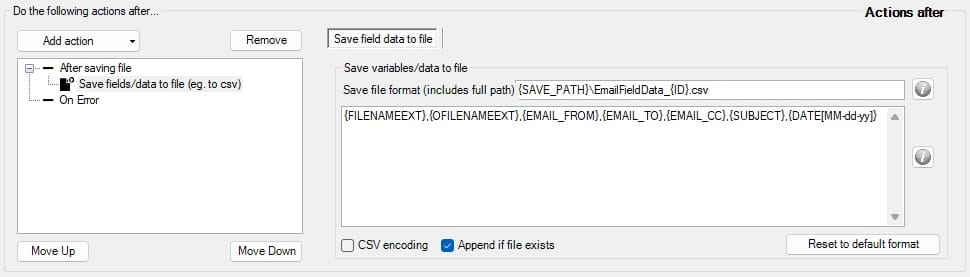
  1. Under Actions after save, add the Save fields/data to file action.
  2. Under Save Meta Data Options, set the Write index data file out format using field tokens such as {FILENAMEEXT}, {OFILENAMEEXT}, {EMAIL_FROM}, {EMAIL_TO}, {EMAIL_CC}.
  3. Optionally enable CSV encoding, or click Reset to default format to start over.
  4. Chain it after other actions — like Unzip file, Document conversion, or Save to database — so the CSV metadata is written at the end of the rule.

Two ways to capture it: generate a brand-new CSV per email/attachment (handy for one-off audit trails), or point every rule at the same CSV file so the program appends a new row each time — a simple rolling log of every email or attachment that's come through, without a database.

Mail Attachment Downloader PRO — Save .csv metadata action with Write index data file out field tokens

The "Save .csv metadata" action — configure header tokens once, apply to every matching email.

🗂️

Per-file CSV metadata

Every downloaded attachment gets its own matching .csv, named identically, carrying header context alongside it.

Rolling appended log

Point multiple rules or emails at one CSV file and let the program append a new row per email — an easy running audit trail.

🧙

Extracted content, not just headers

The same CSV export can include fields pulled from the body or an attachment using the extraction wizard or regex — not just FROM/TO/CC.

Use Case 2

Load CSV/Excel attachment contents straight into a database

Receive automated reports as CSV or Excel attachments? Extract every row and column and load it into SQL Server, MySQL, or any ODBC-compatible database.

📖 See the Step-by-Step Guide
📎

Filter for CSV/Excel attachments

Create a rule filter that matches the emails you want — by sender, subject, or simply by file type (.csv, .xls, .xlsx).

  • Works with reports you already receive on email
  • Or forward/email spreadsheets to a dedicated inbox and let the program pick them up
🗄️

Save every row to your database

Each column becomes a field you assign a name to, imported by default as VARCHAR — with full control over the type.

  • Use the Extraction Wizard per field to change the type or transform the value
  • Every matching email appends its rows to the table automatically
  • Requires an ODBC connection configured to your database first
How the two use cases fit together

One rules engine, two ways out

Both start the same way — filter the email, then choose where the data goes.

1

Filter matching emails

By sender, subject, date, or attachment type

2

Extract the fields

Wizard or regex — from headers, body, or attachment columns

3

Choose CSV or DB

Save/append to CSV (Use Case 1) or map columns to a table (Use Case 2)

4

Runs automatically

Every future matching email is processed the same way, unattended

Don't already receive these reports by email? You can email CSV or Excel files to any address the program monitors and have it extract the attachment and save the rows to your database automatically — giving you a lightweight, on-the-go way to get data into your systems.
How it stacks up

PRO vs. the usual ways people get email data into CSV, Excel, or a database

Most tools stop at "download the attachment." PRO reads headers, body text, and spreadsheet rows — then routes them wherever you need.

CapabilityMail Attachment
Downloader PRO
Manual copy-paste
into a spreadsheet
Basic attachment
downloaders
Cloud email parsers
(Zapier-style)
Auto-generate a matching .csv per downloaded fileVaries
Append every matching email as a new row to one rolling CSV logVaries by connector
Extract custom fields from the email body (wizard or regex)Manual, error-proneTemplate-based, limited
Read every row from an Excel/CSV attachment into a database tableManual, one file at a timeLimited row-level parsing
Column mapping from a loaded sample fileVaries by connector
Type conversion / field cleanup before exportSome transform steps
Runs 24/7 unattended, data stays on your own serverVariesCloud-hosted, subscription
Everything included in PRO

A complete email-to-spreadsheet and email-to-database toolkit

A snapshot of the PRO edition features that make CSV, Excel, and database export painless.

Save .csv metadata action

Write a .csv with the same filename as each download, populated from mail header fields.

Rolling appended CSV log

Point rules at the same CSV file so every matching email adds a new row automatically.

Extraction wizard

Point-and-click extraction from FROM, TO, SUBJECT, and BODY — no regex required.

Regular expression extraction

Full pattern-matching control for advanced or highly variable email formats.

Excel/CSV row extraction

Parse every row from attached spreadsheets, not just the file itself.

Multi-sheet support

Choose exactly which sheet to read from when a workbook has several.

Header-row detection

Auto-import column names when your source file starts with a header row.

Field tokens ({FIELD})

Every extracted value becomes a reusable token for filenames, folders, CSV, or SQL.

Type conversion

Convert extracted fields to the right data type before writing them out.

ODBC database export

Send extracted rows straight into SQL Server, MySQL, Oracle, PostgreSQL, and more.

Multi-account, multi-rule

Run different extraction rules across multiple mailboxes at once.

Windows Service mode

Run 24/7, unattended, in the cloud or on-premise — even without an active login.

Stop retyping email data into spreadsheets or databases by hand

Get Mail Attachment Downloader PRO and start logging headers to CSV or loading attachment rows straight into your database — automatically.