PRO Backup keeps a copy of the emails in your accounts, encrypted on your own system, for as long as you choose. Search it without connecting to the mail server, export it to files other programs open, restore it into a mailbox, or move mail from one kind of account to another. For people and businesses who want their mail safe, and for IT teams who need archives, exports and migrations.
From $49.99 per year · includes everything in Free · 30-day money-back guarantee
Or click any step to see how it works
PRO Parser, PRO Rules Client and PRO Rules Server all include every PRO Backup feature, so you can start here and move up without losing or repurchasing anything.
Search, or click a card to see how it works on the features page, already filtered to PRO Backup.
The source it started with. Connect Gmail and Google Workspace (browser sign-in), Microsoft 365 and Outlook.com, Exchange (shared mailboxes too), and any IMAP or POP3 mailbox, in every edition.
See details →Connect natively through Microsoft Graph or Exchange, with modern sign-in. Shared mailboxes and groups appear in the folder list next to your own Inbox.
See details →A new-account walkthrough with a tile for each provider, and guides for the app passwords Yahoo, AOL, iCloud and Gmail need.
See details →Besides every schedule choice (15 minutes, hourly, at a set time), tick Also download new email as soon as it arrives. IMAP accounts pick up mail within seconds;
See details →Run several sources together in one run, instead of one at a time. PRO Backup runs up to 3 accounts together, PRO Parser up to 5, and the two Rules editions as many as you have (3.x Pro Client stopped at 15).
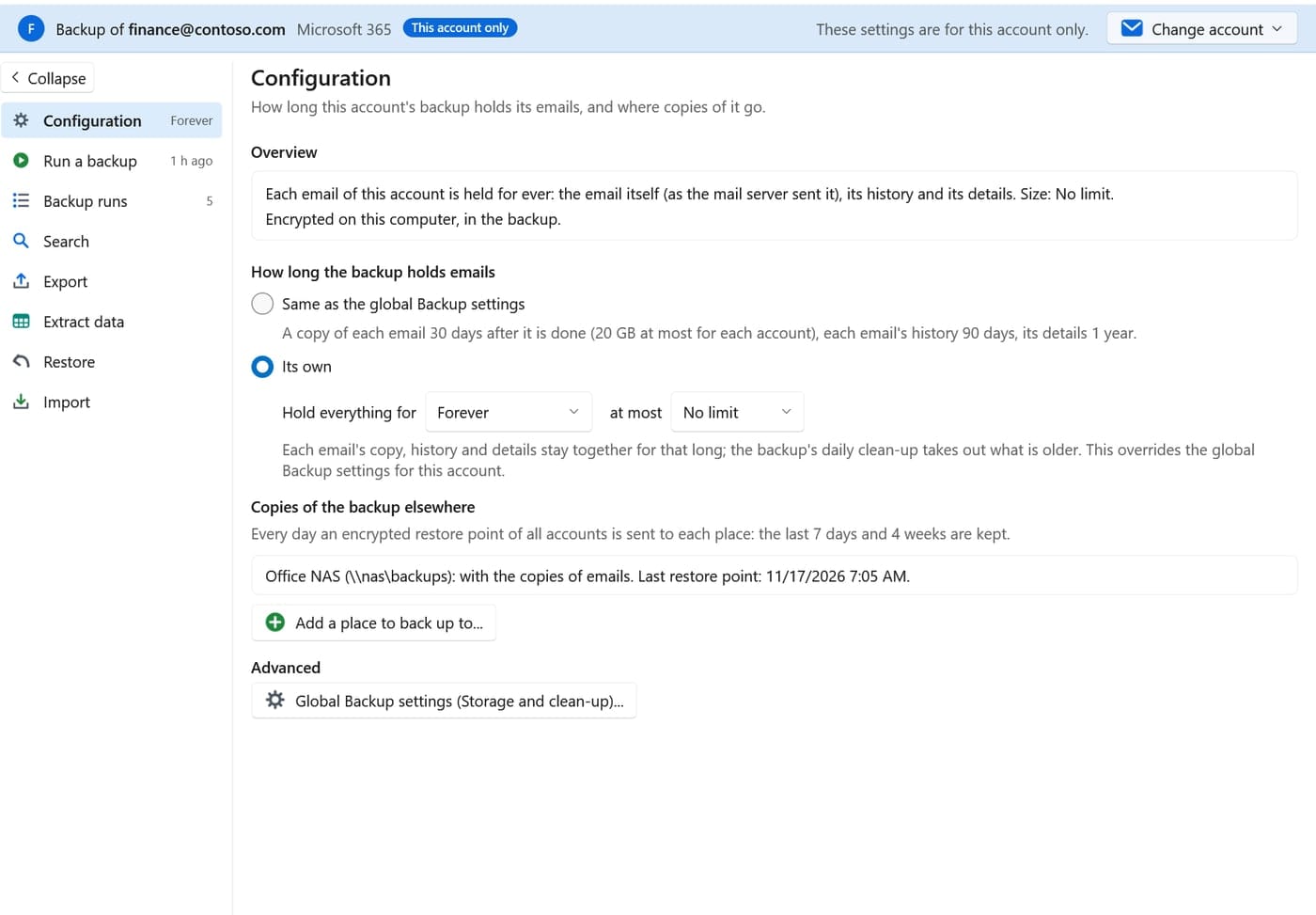
See details →The new Backup tab keeps a copy of every email in an account's folders, encrypted on your own system, for as long as you choose (from 30 days to forever, with an optional size limit, set per account).
See details →Once a day (02:00 by default) the backup's restore points of every account are copied to a folder, a network share, Amazon S3 or Azure Blob storage. The last 7 daily and 4 weekly points are kept.
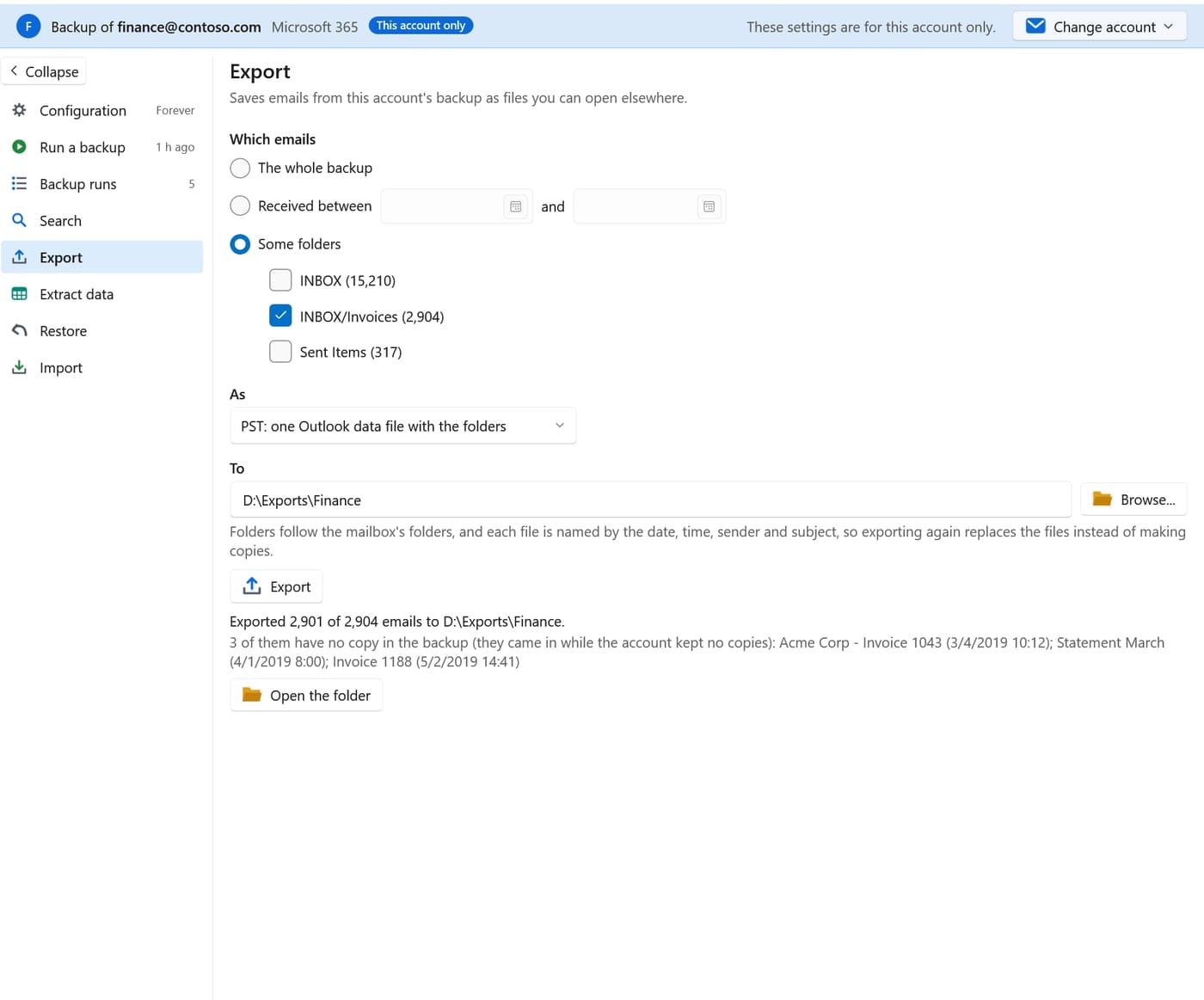
See details →Turn the backup into files other programs open: EML, MBOX (one per folder), MSG, PST for Outlook, PDF (one per email, attachments next to it) or a ZIP of EML files.
See details →Put emails back into their own folders on the server (folders deleted since are made again). Emails already there are skipped, so restoring twice adds nothing.
See details →Choose a different kind of account in Restore's Into box, such as Gmail into Microsoft 365 or Yahoo into IMAP, to copy your mail across.
See details →Bring old mail into an account's backup from a PST file, an MBOX file or Thunderbird-style folder, or a folder of EML files.
See details →Write the details of the backup's emails to a CSV file that Excel opens: one row per email (received, from, to, cc, reply-to, subject, folder, attachments, size) or one row per email address (name, domain,…
See details →Every account and watch remembers each email it has seen, so nothing is downloaded or processed twice, even after you download All mail, restart, or the server renumbers a folder.
See details →The new first tab. Tell it in plain words which emails to download and what to do with them, and the AI draws the rule as a diagram you change by clicking: its conditions, save folder, file names, what to…
See details →The built-in AI runs on your own system with limited rights, after a one-time download of about 2.2 GB. Nothing you type or test is sent anywhere.
See details →GitHub Copilot in VS Code, Claude Code, Gemini CLI and other MCP agents on the same system can ask what was downloaded, which accounts need action and how your rules did.
See details →Each account can send a run summary when a download ends: always, when files were saved or something went wrong, or only when something went wrong, short or detailed.
See details →Set up channels once, in Options › Notifications, and use them for run summaries, error alerts, expected-email alerts and the Send notification step. Addresses and tokens are kept encrypted.
See details →See every email or file, by run or by day, with filter chips, search and pages. Action required lists accounts that can't download, each with a button that fixes it, and every email says why it saved nothing.
See details →The first time 4.0 starts, it copies your 3.x accounts, settings and licence once, with a banner saying so. It never changes the 3.x settings, so 3.x keeps working.
See details →No feature matches that yet. Browse all features.
Each account gets its own backup with its own settings. These are the real windows, shown with made-up Contoso data.
The Backup tab keeps a copy of the emails in an account's folders, encrypted on your own system, for as long as you choose: from 30 days to forever, with an optional size limit, set per account.

A backup run copies the account's new emails into its backup. The page shows what is in the backup, when the last run finished and when the next one starts on its own.
Find an email by subject, sender or file name in the backup itself. You do not need to connect to the mail server, and it works for emails that were deleted from the server and kept in the backup.
Pick one email or several from the results and export them, or restore them.
A backup on one system is lost with that system. Once a day (02:00 by default) the backup's restore points are copied to a folder, a network share, Amazon S3 or Azure Blob storage. The last 7 daily and 4 weekly points are kept.
Turn the backup into files other programs open.
File names are the same every time, so exporting again replaces the files instead of adding copies. Useful for an archive for a lawyer, an audit or a departing employee. See also email archival.

Bring old mail into an account's backup from a PST file, an MBOX file or Thunderbird-style folder, or a folder of EML files.
Restore puts emails back into their own folders on the server. Folders deleted since are made again, and emails already there are skipped, so restoring twice adds nothing. It works with IMAP, Gmail, Microsoft 365 and Exchange accounts, and can be stopped and continued later.
Move mail between account types: choose a different kind of account in the Into box, such as Gmail into Microsoft 365 or Yahoo into IMAP. Pick the folders, and whether read/unread, stars and labels (as categories) come along. It is a copy: nothing is deleted from the source. Mail only: calendars, contacts, rules and signatures are not included.
Restore is built and tested against test servers. It has not yet been tried on real Microsoft 365, Exchange and Gmail mailboxes, which is part of what the preview is for. For Gmail it paces itself around Google's daily limit, so a very large mailbox can take several days. POP3 accounts can be exported but not restored.
Write the details of the backup's emails to a CSV file that Excel opens: one row per email (received, from, to, cc, reply-to, subject, folder, attachments, size) or one row per email address (name, domain, first and last email, with your own and no-reply addresses left out).
It can run after every backup and never adds the same row twice. If you use addresses for marketing, check whether you need the senders' consent first.
Every account remembers each email it has seen, so nothing is downloaded or processed twice, even after you download All mail, restart, or the server renumbers a folder. Free keeps 1 day of History; PRO keeps it as long as you choose.
Each account can send a summary when a run ends: always, when files were saved or something went wrong, or only when something went wrong, short or detailed. Channels: Slack, Microsoft Teams, Discord, Google Chat, Telegram, ntfy, Pushover, a custom webhook and email. Tokens are kept encrypted.
The notification channels have so far been tried against test services only.
GitHub Copilot in VS Code, Claude Code, Gemini CLI and other MCP agents on the same system can ask what was downloaded and which accounts need action. It is read-only, off until you turn it on, reachable only from your computer and protected by a token. Agents cannot start downloads or change settings.
The program runs on your own system and talks to your mail provider directly. There is no Gearmage cloud service in between, and nothing is uploaded unless you add a place to copy the backup to.
No Outlook or other mail program is needed.
Browser sign-in.
Through Microsoft Graph, shared mailboxes included.
On-premises Exchange through EWS. Microsoft is ending EWS for Exchange Online, so use Microsoft 365 there.
Ready-made setups for Yahoo, AOL, iCloud, Zoho, GoDaddy, IONOS, Comcast, WEB.DE, Zimbra and 150+ more, picked from your address.
PRO Backup includes everything in Free. See the free version.
| Capability | Free | PRO Backup |
|---|---|---|
| Save attachments, emails or both | ✓ | ✓ |
| Folders and file names | One format per account | One format per account (many folders and names: PRO Parser) |
| Accounts in one run | 1 | Up to 3 |
| Schedule | None or Daily | Every schedule, and new email as it arrives |
| History | 1 day | As long as you choose |
| Backup tab: encrypted, searchable copy with retention | Preview | ✓ |
| Copies to a share, S3 or Azure Blob, with a recovery key | ✗ | ✓ |
| Export to EML, MBOX, MSG, PST, PDF, ZIP | ✗ | ✓ |
| Import PST, MBOX, EML | ✗ | ✓ |
| Restore, and move mail between account types | ✗ | ✓ |
| Extract addresses and email details to CSV | Up to 25 emails of the last day | ✓ |
| Run summaries and notification channels | ✗ | ✓ |
| Read-only AI agents (MCP) | ✗ | ✓ |
PRO Backup is about keeping, finding and restoring mail. If you also want to do something with what is inside the emails, the next editions each include the one before.
Read values out of emails and files (invoice numbers, dates, totals, line items) and save many emails into many folders, with file names built from any field (PRO Backup and Free save each account in one format). Up to 5 accounts per run. $99.99 per year.
Automation and hand-offs: rules with their own conditions, save folders, names and steps, uploads to cloud storage and document systems, and unlimited accounts. Available as Client and as Server (Windows service).
No. Mail Attachment Downloader runs on your own system and reads your mailbox directly. The backup is stored encrypted on that computer. Nothing goes through a Gearmage cloud. A copy leaves the computer only when you add a place to copy it to, such as a network share, Amazon S3 or Azure Blob storage.
Yes. Restore puts emails back into their own folders on the server, makes folders again if they were deleted, and skips emails that are already there, so restoring twice adds nothing. It works with IMAP, Gmail, Microsoft 365 and Exchange accounts. POP3 accounts can be exported but not restored. Restore has so far been built and tested against test servers; the preview period is partly for trying it on real mailboxes, so try it on a spare mailbox first.
Export to EML, MBOX (one per folder), MSG, PST for Outlook, PDF (one per email, with attachments next to it) or a ZIP of EML files. Import from PST, MBOX (including a Thunderbird-style folder) or a folder of EML files.
PRO Backup runs up to 3 email accounts together in one run. Accounts you set up beyond that are kept and run on their own. PRO Parser runs up to 5, and the PRO Rules editions as many as you have.
Free saves attachments, emails or both from one account per run, with a Daily or no schedule and one day of History. It does not include the Backup tab. If you want a long-term copy you can search, export or restore, you need PRO Backup. You can see the Backup tab in Free as a preview.
PRO Backup is $49.99 per year. It includes everything in Free. There is a 30-day money-back guarantee. A PRO program without a licence works as Free.
If you copy the backup to a share, S3 or Azure Blob, those copies are encrypted, and the recovery key lets you open them on another system. Keep the recovery key somewhere safe: Gearmage does not keep a copy of it.
Try PRO Backup for 30 days, or see the price: $49.99 per year, with a 30-day money-back guarantee.
Click any box to see how that part works.